Friday, April 20, 2012
Monday, April 16, 2012
Webinar: 10 Tips for Easy Geotagging in Any Classroom
Wednesday, April 18, 20128pm Eastern/ 7pm Central/6pm Mountain/5pm Pacific
 Tom Baker
Kansas City, KS
Geotagging, using pictures and other digital files to support student inquiry, fieldwork, and data analysis, can be a simple and fun ways to engage students in GIS and GPS. Student data, photos, and recorded audio can build on interactive basemaps and allow students to tell their own "geostories" about a place or phenomenon. Ideal for earth and environmental science and geography teachers, this webinar will only use tools that are free and web-based, allowing educators to use tomorrow.
Saturday, February 18, 2012
Flickr Photo Viewer, for Current Events in the Classroom?
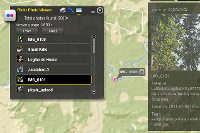
Here's an interesting web application that lets you do a keyword search in Flickr and then maps the images with a marker and thumbnail.
 What you can do:
* Find a location in the world in a flash.
* Search flickr photos with your desired keywords.
* Explore flickr photos that are taken after a specified date.
* Click on the small thumbnail to enjoy the whole picture.
Perhaps the best use of this tool is to combine the date and keyword search, to track photos streaming into Flickr during or after an event. Should be great for exploring current events in the classroom!
For science class, search for crocus or other phenological indicators and set a start date of February 7 for example.
 What you can do:
* Find a location in the world in a flash.
* Search flickr photos with your desired keywords.
* Explore flickr photos that are taken after a specified date.
* Click on the small thumbnail to enjoy the whole picture.
Perhaps the best use of this tool is to combine the date and keyword search, to track photos streaming into Flickr during or after an event. Should be great for exploring current events in the classroom!
For science class, search for crocus or other phenological indicators and set a start date of February 7 for example.
Tuesday, July 19, 2011
Mapping Geotagged Images from Flickr in Less than 10 Seconds
This video is a quick tutorial for streaming geotagged images into the map viewer at ArcGIS.com. The map viewer was recently updated and now has a great utility for KML files, among many other great new features.
Friday, March 11, 2011
#NSTA 2011 - GeoTagging [ #NSTA11 ]
We will hold two open workshops on Saturday, March 12 at 8:00AM and 4:00PM in Moscone room 304. This 90 minute session will be lead by Tom Baker & Joseph Kerski (Esri) with Roger Palmer (GISetc). All registered NSTA attendees are welcome
Select software used in demos:
Data used in demos:
Select software used in demos:
- Microsoft ProPhoto Tools 2 (free)
- Esri ArcGIS Explorer desktop (free)
Data used in demos:
- ISTE2010_GeoTag.zip [186 Kb]
Tuesday, February 22, 2011
GeoTech 2011 - GeoTagging and More in Dallas, TX
Bishop Dunne GeoTech Conference, March 3-5, 2011
GeoTech is the superb gathering of educators in Dallas, TX during the first week of March. This year, the conference will include a GeoTagging workshop Thursday afternoon, presented by Tom Baker & Roger Palmer.
Required software
Required data
Be sure to see the Mobile and Web GIS tools for the classroom presentation on Friday!
GeoTech is the superb gathering of educators in Dallas, TX during the first week of March. This year, the conference will include a GeoTagging workshop Thursday afternoon, presented by Tom Baker & Roger Palmer.
Required software
- Microsoft ProPhoto Tools 2 (free)
- Esri ArcGIS Explorer desktop (free)
Required data
- ISTE2010_GeoTag.zip [186 Kb]
Be sure to see the Mobile and Web GIS tools for the classroom presentation on Friday!
Friday, February 11, 2011
Finding Needles in Haystacks: Learning from patterns in GPS data
Finding Needles in Haystacks: Learning from patterns in GPS data
by Roger Palmer, GISetc & Tom Baker, Esri
at TCEA 2011 in Austin, TX

GPS gets your students out into local environments and interacting with the world. See how simple it is to integrate geocaching, EarthCaching, and data collection into your classroom.
Download the Session Presentation [PDF].
by Roger Palmer, GISetc & Tom Baker, Esri
at TCEA 2011 in Austin, TX

GPS gets your students out into local environments and interacting with the world. See how simple it is to integrate geocaching, EarthCaching, and data collection into your classroom.
Download the Session Presentation [PDF].
Wednesday, February 9, 2011
Tuesday, November 16, 2010
chirp! for geocaching
We haven't seen a product like this before and since it's targeted to geocachers, thought we'd share it: a wireless geocaching beacon. At the very least, it could serve as an "intelligent" geocache, perhaps at its best, it could better allow those with low vision to have a better geocaching experience.
from the Garmin website:
chirp is a one-of-a-kind wireless beacon designed specifically for the outdoor adventures of geocaching. Affordable, durable and waterproof, chirp can communicate with, and be programmed by, any compatible wireless-enabled Garmin handheld (sold separately). chirp stores hints, multicache coordinates, counts visitors and confirms the cache is nearby. chirp is password protected and has a battery life of up to one year.
Get & Store Hints
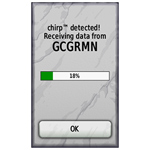 | 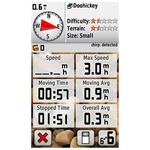 |
chirp detection screen (on an Oregon) | Trip computer screen showing chirp detection indication on dashboard (on an Oregon) |
chirp can be programmed by any compatible wireless-enabled Garmin handheld to store geocaching hints and other information. When other geocachers arrive near your cache, they’ll be alerted that the cache is nearby, and then they’ll be able to access the hints you’ve loaded into chirp. And when you return, chirp will tell you how many visitors have been to your cache.
Wednesday, November 10, 2010
CAST 2010: A Picture's Worth a 1000 Lessons
We'll be in Houston, TX for the Texas Science Teachers' Convention CAST! The presentation is Friday.
Code: WS2184
Today's cameras are truly tying more data together in rich and meaningful ways. When combined with GPS locations these tools can really be powerful data collection devices to do investigations. We will cover how to get your pictures position information, how to store this information, what to do with geotagged images once taken and finally how to best use them as class room tools in many different sciences. It won't even have to come out of your science budget!
Audience: Teacher / Pre-Service
Grade Level: Middle School
Content: Earth / Space Science / Life Science
Start Time: 4:30 PM - 5:30 PM
Scheduled Room: 362 AD
Updated 11/15/2010: Session PowerPoint now available for viewing or download via Google Docs.
Updated 11/15/2010: Session PowerPoint now available for viewing or download via Google Docs.
Subscribe to:
Comments (Atom)